
To retrieve the incidents generated within a specific time period.
GET
https://Logpoint-IP/incidents
Parameter |
Value Type |
Description |
|---|---|---|
username |
String |
A Logpoint username |
secret_key |
String |
Secret key of Logpoint. Refer to Finding the Access Key. |
requestData |
JSON Object |
A JSON objects containing the following parameters: ts_from: Start timestamp value. ts_to: End timestamp value. |
The parameters should be included in the request body as raw text.
{
        "username": "John",
        "secret_key": "a1b2c3d4e5f6g7h8i9j0k1",
        "requestData": {
                "version": "0.1",
                "ts_from": 1633085529,
                "ts_to": 1640595047
                }
        }
Note
Content-Type, Content-Length, and Host must be passed in the request header. Content-Type should be application/json.
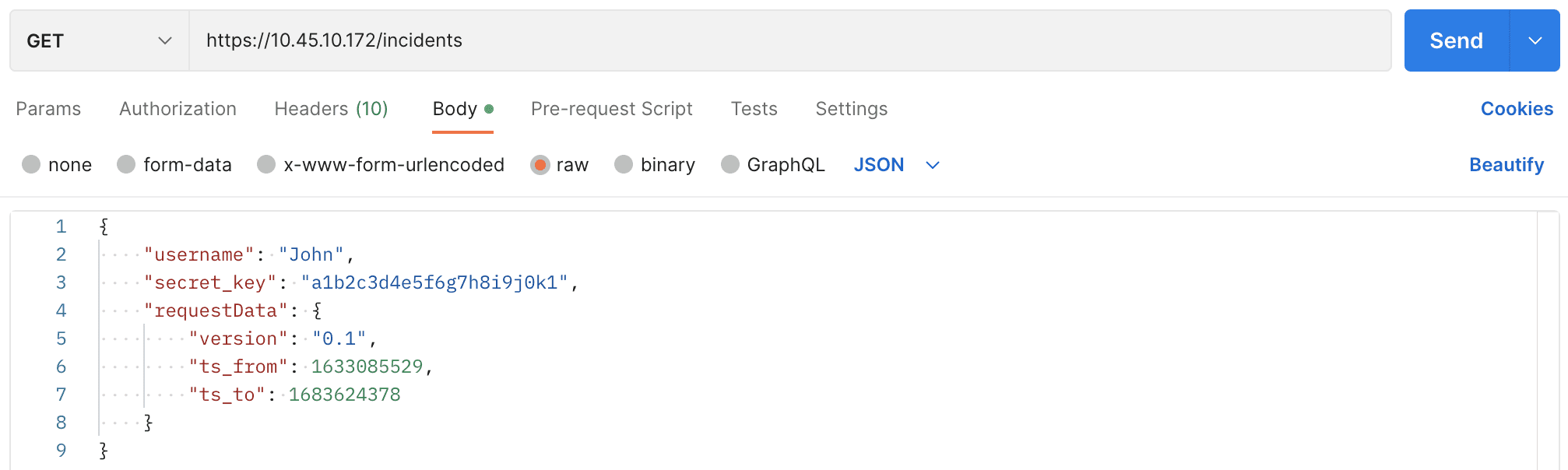
Incident Request using Postman.
curl --location --request GET 'https://10.45.10.172/incidents' \
--header 'Content-Type: application/json' \
--data '{
        "username": "John",
        "secret_key": "a1b2c3d4e5f6g7h8i9j0k1",
        "requestData": {
                "version": "0.1",
                "ts_from": 1633085529,
                "ts_to": 1640595047
                }
        }'
{
"success": true,
"incidents": [incident1, incident2, …, incidentN]
}
{
    "type": "Alert",
    "alert_obj_id": "61b1cce5c472652e64a27cc5",
    "alertrule_id": "02df0d1b985ba3af48fdc4287c560d11",
    "incident_id": "52985081d974e636c930d7c604734705",
    "name": "Average severity per device alert",
    "description": "Fires an alert if the average severity per device is more than a certain threshold",
    "username": "5bebd9fdd8aaa42840edc853",
    "user_id": null,
    "assigned_to": "5bebd9fdd8aaa42840edc853",
    "visible_to": [],
    "tid": "",
    "rows_count": 100,
    "risk_level": "medium",
    "detection_timestamp": 1640599338.5200958,
    "loginspect_ip_dns": "101.45.45.45",
    "Logpoint_name": "Logpoint",
    "status": "unresolved",
    "comments": [],
    "commentscount": 0,
    "query": "action=*",
    "repos": [
        "127.0.0.1:5504"
    ],
    "time_range": [
        1640595600,
        1640599200
    ],
    "throttle_enabled": false,
    "attack_id": [
        "T1592",
        "T1608",
        "T1078",
        "T1003.002",
        "T1001"
    ],
    "attack_tag": [
        "Gather Victim Host Information",
        "Stage Capabilities",
        "Valid Accounts",
        "Security Account Manager",
        "Data Obfuscation"
    ],
    "attack_category": [
        "Initial Access",
        "Privilege Escalation",
        "Credential Access",
        "Resource Development",
        "Reconnaissance",
        "Defense Evasion",
        "Persistence",
        "Command and Control"
    ],
    "metadata": [],
    "log_source": [
        "Firewall",
        "Fortigate"
    ],
    "notifications": [
        {
            "dispatch_option": "manual",
            "email_emails": [
                "[email protected]"
            ],
            "email_template": "<pre style=\"text-align: left; text-size-adjust: auto;\"><font face=\"avenir, helvetica, arial, verdana, sans-serif\"><span style=\"caret-color: rgb(255, 255, 255);\">* - ::\r\n\r\n       {{alert_name}}\r\n     - Displays the name of the alert.\r\n   * - ::\r\n\r\n       {{user_id}}\r\n     - Displays the total count of log messages that triggered the alert.<br></span></font></pre>",
            "link_disable": false,
            "logo_enable": true,
            "logo_type": "default",
            "notify_email": true,
            "raw_emails": [
                "[email protected]"
            ],
            "simple_view": null,
            "subject": "Test",
            "template_file": "alert_5bebd9fdd8aaa42840edc853_b'IF3GK4TBM5SSA43FOZSXE2LUPEQHAZLSEBSGK5TJMNSSAYLMMVZHI==='.tmp",
            "threshold_option": null,
            "threshold_value": null,
            "type": "email"
        }
    ],
    "id": "61c98f2af2adef60601f5a86"
},
You can filter incidents generated within a specific time period based on the following parameters:
Parameter |
Value Type |
Description |
|---|---|---|
name |
String |
Identification parameter for incidents. The values supported are: Name: Name of the incidents. Incident ID: Unique identifier of the incidents. AlertRule ID: Unique identifier of the alert rule that generates the incidents. |
status |
String |
Resolution state of the incidents. The values are closed, resolved, and unresolved. |
type |
String |
Source via which the incidents are generated. The values are alert, search, and ueba. |
risk |
String |
Severity level of the incident. The values are critical, high, medium, and low. |
attack_category |
String |
Attack category associated with the incidents. |
attack_tag |
String |
Attack tag associated with the incidents. |
log_source |
String |
Log source information associated with the incidents. |
Metadata fields |
String |
A user-defined parameter associated with the Metadata field of Alert or Incident Categorization. Refer to Creating an Alert Rule or Creating an Incident for more detail. |
You can insert the parameters in the endpoint URL as query parameters to form a query string. However, these parameters are not mandatory.
Sample Queries
https://Logpoint-IP/incidents?name=Windows Registry Value Change&risk=critical&risk=high&type=alert&status=unresolvedThe above query filters the incidents named Windows Registry Value Change generated from alert having critical and high severity level and are in unresolved state.
https://Logpoint-IP/incidents?attack_category=Command and Control,Collection&attack_tag=Protocol Impersonation&log_source=Webserver&System=Microsoft WindowsThe above query filters the incidents whose attack categories are Command and Control and Collection, attack tag is Protocol Impersonation, log source value is Webserver, and System value is Microsoft Windows. Here System is the custom metadata field provided by the user while categorizing the alert or incident.
Note
The only supported method to include multiple query parameters in the query string is by using an ampersand (&). You can also send multiple values in a single parameter by using a comma (,).